

Models
The model is the "brain" that answers. HotMoE runs it on your computer: pick the one that suits your memory and what you need to do.
TabsCatalogRecommendedDownloadingYour filesWhich to chooseMixture-of-Experts
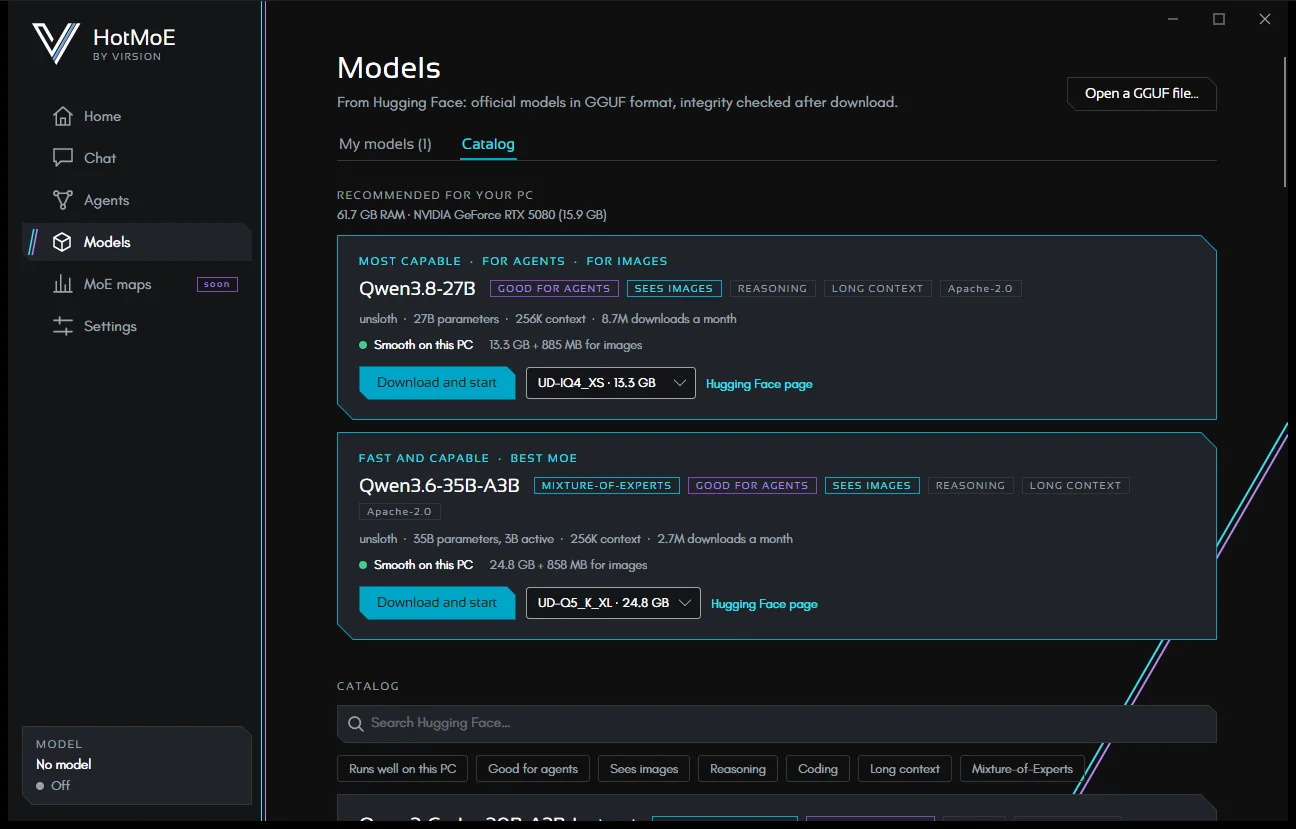
The two tabs
At the top, under the title, there are two tabs:
- My models: the models folder, with Open folder, and the models already on your computer. The number in brackets tells you how many there are. If you have none, Browse the catalog takes you to the other tab.
- Catalog: Recommended for your PC, then search, filters and the list of models to download.
The page opens on My models if you have models, otherwise on Catalog. Open a GGUF file… is at the top, outside the tabs.
Catalog
The Models page reads the catalog live from Hugging Face, the site where the models are published. It lists GGUF models republished by unsloth, ggml-org and lmstudio-community: publishers that repackage the official models. It shows the most downloaded of the month; the search box searches Hugging Face.
Filters
Click a filter to turn it on or off: Runs well on this PC, Good for agents, Sees images, Reasoning, Coding, Long context, Mixture-of-Experts.
Capabilities are read from the model's own data:
- Good for agents: the model supports tools and has at least about 7 billion parameters.
- Sees images: the repository has an image projector (an
mmprojfile), the part that lets the model see images. - Mixture-of-Experts: confirmed from the header of the model file.
What each card shows
- The capability tags, the license and the publisher.
- Parameters (for a Mixture-of-Experts, also the active ones), context length, downloads in the month and size.
- How it runs on this PC: Smooth, Usable, Slow, Only with an expert map: slow or Too big for this PC. The expert-map band is for MoE models up to about twice the memory of RAM and graphics card together: they run with a map of the experts, which keeps the most used ones in memory (Qwen3-235B on an RTX 5080 with 64 GB: 4 to 6 tokens/s). The estimate comes from the memory and speed of your RAM and graphics card: it's a guide, not a measurement. For common NVIDIA cards the app knows the real memory speed from the card's name (lower on laptops); for other cards it uses a prudent value.
- Version chooses the quantization, that is how much the model is compressed: a smaller version needs less memory, with slightly lower quality. Each card already selects the best version for this PC: the largest one that runs smoothly, but not below about 3.5 bits per weight; otherwise the largest usable one from Q4 up. Never above Q6, so some memory stays free. If a version of the model is already on disk, that one is selected.
- A link opens the model's page on Hugging Face.
Models that need a Hugging Face account are not listed. The last catalog is saved on your computer: the page shows it right away and works offline too, with a notice when Hugging Face is not responding.
Recommended for your PC
At the top of the Catalog tab, up to five picks among the most downloaded models:
- the most capable one that runs usably on your computer;
- the most capable one that is already smooth at Q4 quality: fast without lowering quality;
- the best one for agents;
- the best one for images;
- the best MoE: the largest Mixture-of-Experts that runs well.
The same model can be picked for more than one reason. On first launch, the Welcome page offers the first recommended model.
Downloading and starting
- Download and start: a download with progress and time left; Pause and resume whenever you like, from where you stopped.
- When the download ends the app checks the file's size and the SHA-256 fingerprint published by Hugging Face: a corrupted file is discarded.
- Files go into the models folder, under publisher/repository. For a model that sees images, the projector is downloaded next to the model.
- Start loads a model already downloaded. One at a time: starting another replaces the one in use.
Your GGUF files
You can use any model in GGUF format, the model format of llama.cpp.
- Open a GGUF file… loads a model from any folder.
- If the folder of the GGUF you open also has an
mmproj*.gguffile, the app loads it too and the model can see images. - My models lists the models in the models folder; models split into several files appear as one, with the number of parts. Open folder shows it in File Explorer.
- Generation settings come from the file itself, if it contains them, or from those recommended for the model's family (Qwen, Gemma, gpt-oss, DeepSeek); otherwise the engine's are used. Nothing to tune by hand.
Which one to choose
- To start: the models under Recommended for your PC.
- Files, email and agents: a model marked Good for agents.
- Screenshots, photos and scanned pages: a model marked Sees images.
- Slow or too big: choose a smaller Version, or a smaller model.
- To go faster: the CUDA engine on NVIDIA cards, a shorter context or reasoning off for simple questions.
Mixture-of-Experts
A Mixture-of-Experts (MoE) model is made of many "experts", and for each word it uses only a few. That's why a 35-billion-parameter MoE that activates about 3 billion at a time answers with the quality of a large model and the speed of a small one. These are the models that the MoE maps technology, coming soon, works on.
HotMoE is a Virsion project. This guide describes the app as it is today: what is still on the way is marked as such.