

HotMoE
Chat and agents with AI models that run on your own computer. No account and no subscription: your conversations, files and email stay on your PC.
What it does
Chat
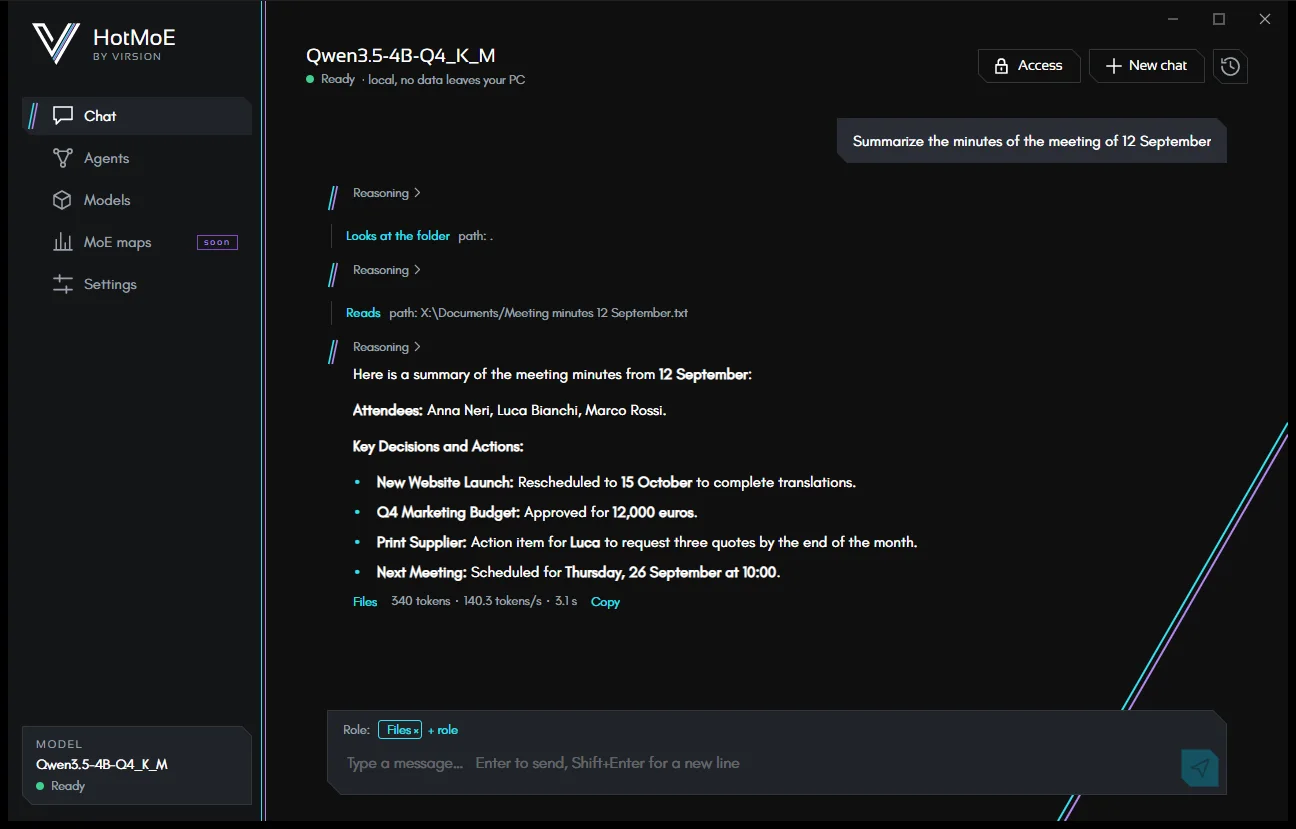
Conversations with a local model: visible reasoning, formatted text, code, tables and history.
Chat →The chat that works
When needed, the chat searches and reads your files or your email: it picks the right role for the request by itself.
Roles and access →Agents
Saved assistants with their own instructions, folders and permissions. They tidy up folders, work on code, use MCP tools.
Agents →Link Gmail, iCloud, Yahoo, Libero or your own domain: search, read, save attachments, write drafts. It sends only with your yes.
Email →Models
A catalog read from Hugging Face, with the models recommended for your PC. Downloads that resume and are integrity-checked, or your own GGUF files.
Models →Privacy and security
Everything runs locally. Granted folders, confirmations for risky actions, a log of every action and undo.
Privacy and security →At a glance
- Local models: a catalog read from Hugging Face, with filters, an estimate of how each model runs on your computer, and recommended picks. You can also use any GGUF model you already have.
- GPU acceleration: the included Vulkan engine works with any graphics card; with an NVIDIA GPU you can download the faster CUDA engine. Without a dedicated GPU the app still works, more slowly.
- Chat with reasoning you can look into, formatted replies (headings, lists, tables, code), speed statistics and searchable history. With a model that sees images, you can also send it images.
- Agentic chat: with the folders and email you grant, the chat activates the right role by itself (Files, Tidy up, Code, Email) and uses its tools.
- Custom agents, from a ready-made gallery or from scratch: instructions, granted folders, commands, external MCP tools and email accounts.
- Documents: text, PDF and Word files can be read and searched by content; text files can also be edited in part.
- Email via IMAP/SMTP with any provider: search, reading, attachments, drafts, and sending always confirmed, with a message you can correct before it goes.
- Statistics: how hard the model works, what the same work would cost in the cloud, how fast it runs with a map; all computed on your PC.
- Control: every risky action asks for confirmation, everything ends up in a log, and changed files can be restored.
- Five languages: English, Italian, French, German and Spanish. Models reply in the language you write in.
- Memory (optional, off by default): the chat remembers short notes about you and searches past conversations. You see and delete everything in Settings.
Requirements
| What | Requirement |
|---|---|
| System | 64-bit Windows 10 or 11. Linux and macOS are in preparation. |
| Memory | Depends on the model you choose. For each model the app estimates how it runs on your PC, and recommends the ones that fit. |
| Disk | The space of the models you download: each model shows its size in the catalog. |
| Graphics card | Optional. Any GPU with the included Vulkan engine; NVIDIA with driver 580 or later for the CUDA engine. |
| Internet | Only to browse the model catalog, download models and engine, and for email if you use it. After that, chat and agents work offline. |
How the app is laid out
A bar on the left leads to the sections: Home (the welcome page, with your computer and the recommended model), Chat, Agents, Models, MoE maps, Statistics, Settings and Info (who makes HotMoE, Virsion's other products and how to support the project, also reachable from the Support the project link). At the bottom, the Model box shows the loaded model and its state: Off, Loading…, Ready or Error.
To begin, read Getting started.
HotMoE is a Virsion project. This guide describes the app as it is today: what is still on the way is marked as such.