

Local LLM in 2026: what it is, which models to run and what your PC really needs
 By Gianmarco Virzì ·
Well into 2026, we’re in the middle of the artificial intelligence revolution. AI is used in more and more fields, and it’s becoming harder and harder to do without.
A local LLM is an AI model that runs entirely on your own computer instead of on a company’s servers. This guide covers what it is, which models to use and what your PC needs.
A problem that’s ignored, or at least underestimated
Most of us have got to know and have worked with AI models such as ChatGPT, Claude, Grok, Gemini, Mistral and many others.
Precisely because they’re used for so many things, though, one problem is starting to matter more and more: privacy. We casually hand these models personal information, company data, or even actual details about how a business works.
The issue is that these models run in the cloud, or more precisely in data centers managed by companies that can have access to our data. To be clear, the aim of this article is not to demonize what these companies do: the data is protected by data protection rules and by security measures. But that doesn’t change the facts. The conversations and the data exchanged with these models travel over the internet, live there, and in some cases could be used to train the next models (there are ways and settings to avoid that last part).
To keep your data safe, however, there are local LLMs: AI models that run on your own computer. To make sense of the questions and topics in this article, we first need to understand what they are.
What is a local LLM
LLMs (Large Language Models), better known as “AI models”, are files whose size can range from a few gigabytes for the smallest models to several hundred GB for the largest.
Inside these files are the so-called “weights”: billions of numbers, or “parameters”, learned while the model was being trained.
To use these files you need an inference engine: a program that can load them into memory and, thanks to the weights, write one piece of a word at a time, known as a token.
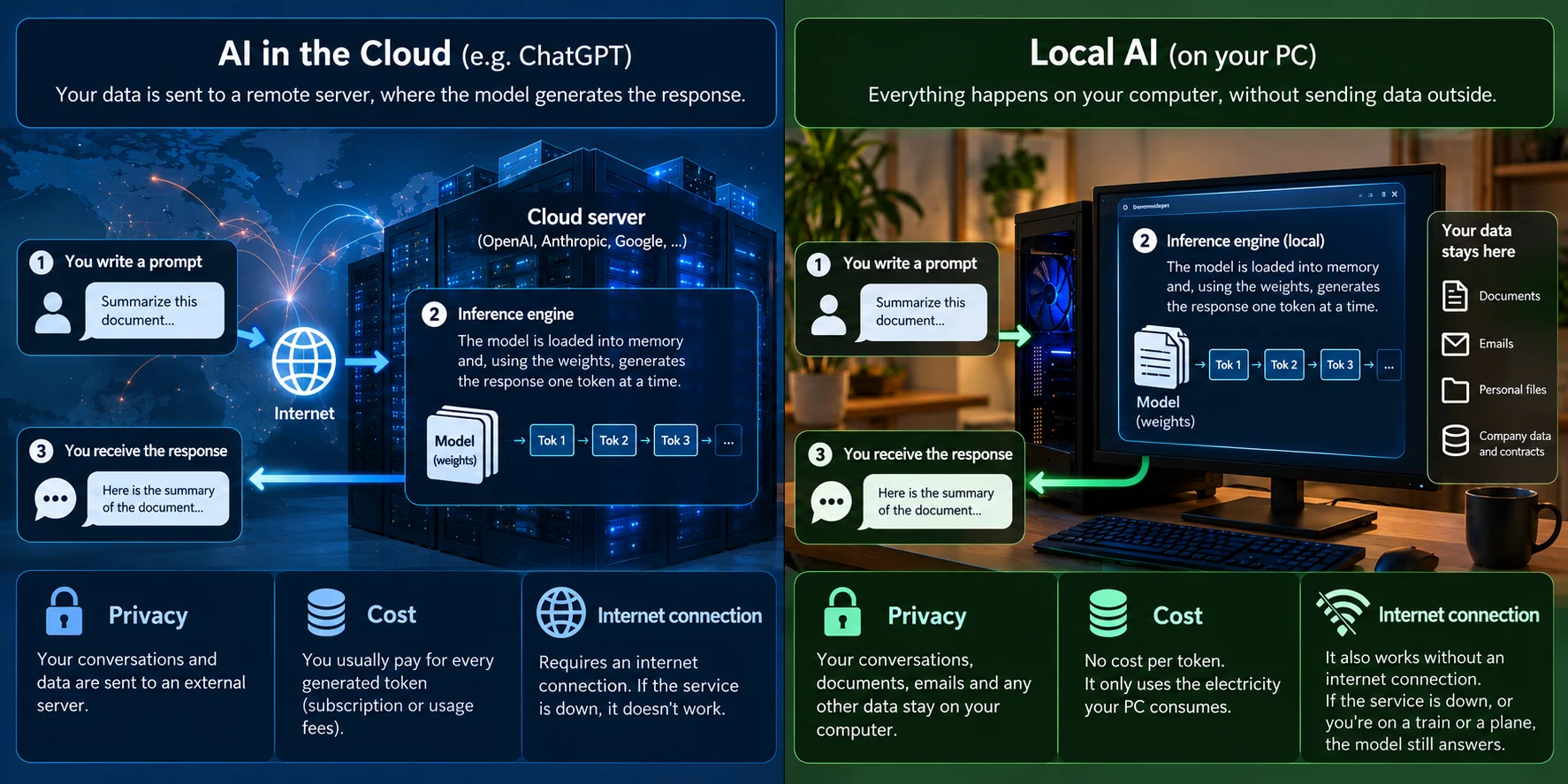
When you use ChatGPT, this happens on a cloud server somewhere. With a local LLM it happens on your computer, which leads to three main differences:
- Privacy: your conversations, documents, emails and any other data stay on your computer. For companies (and not only companies) that handle customer data and contracts, this alone can be worth the move to local AI.
- Cost: local AI models aren’t billed per generated token (unlike the paid ones), and using them costs nothing except the electricity your PC draws.
- They work without an internet connection: if the service is down, or you’re on a train or a plane (hopefully not while driving), the local model will answer anyway.
It’s also worth being clear about what a local LLM is not.
A local model is not a free copy of the biggest frontier cloud models, like the ones from OpenAI, Anthropic or Google mentioned above. Those models run on hardware no home computer can match, and on extremely hard tasks they’re still better.
But over the last year the gap has narrowed a lot. For writing, answering questions about your files, summarizing, or even helping with some agentic tasks (like writing emails or searching your PC), a good local model knows its stuff.
For example, you can use a local model to look for information in the files on your computer even if they contain personal data.
Local LLM hardware requirements: what your PC really needs
Over the last two years, precisely because of AI, consumer hardware has become considerably more expensive. So knowing how hardware is used for inference (the process in which the AI applies what it has learned) can turn out to be extremely important.
Memory: the model has to live somewhere
While you’re using a model, it has to stay loaded in memory, and there are three places it can be: the graphics card’s memory (VRAM), normal RAM, or a bit of both.
So the first question is: “which model can run on your PC with the memory you have?”
Luckily, AI models are almost always used in a compressed version, called quantized. The 4-bit version (you’ll recognize it by labels like “Q4_K_M” in the name) is usually a good compromise: much lighter, with little loss of precision.
As a rough guide, a model takes about 0.6 GB per billion parameters, so a model with 30 billion parameters will weigh around 17–18 GB, while one with 235 billion parameters will be between 125 and 150 GB.
And that’s not all, because on top of the file you need extra space for the conversation’s context and for the engine that reads the weights.
Speed: why do the graphics card and RAM matter?
To write each token, the computer needs to read different parts of the model quickly. Token generation speed doesn’t depend so much on how powerful the processor is, but on how fast the memory is.
A modern graphics card, for example, is much faster than RAM. A model that sits entirely in VRAM will be very fast, while the same model in RAM will be much slower.
How many tokens per second do you need for it to feel good? Humans read at about five tokens per second on average. At Virsion we consider a model usable from 6 tokens per second and smooth from 15. Below that, you end up waiting for the answer instead of reading it.
MoE models: a change of rules
This is the most interesting news for anyone using local models. Many of today’s best models are Mixture-of-Experts, or MoE. Instead of a single dense block used for every token, the model is split into many small experts, and for each token only a few of them work, activating part of the whole model’s parameters.
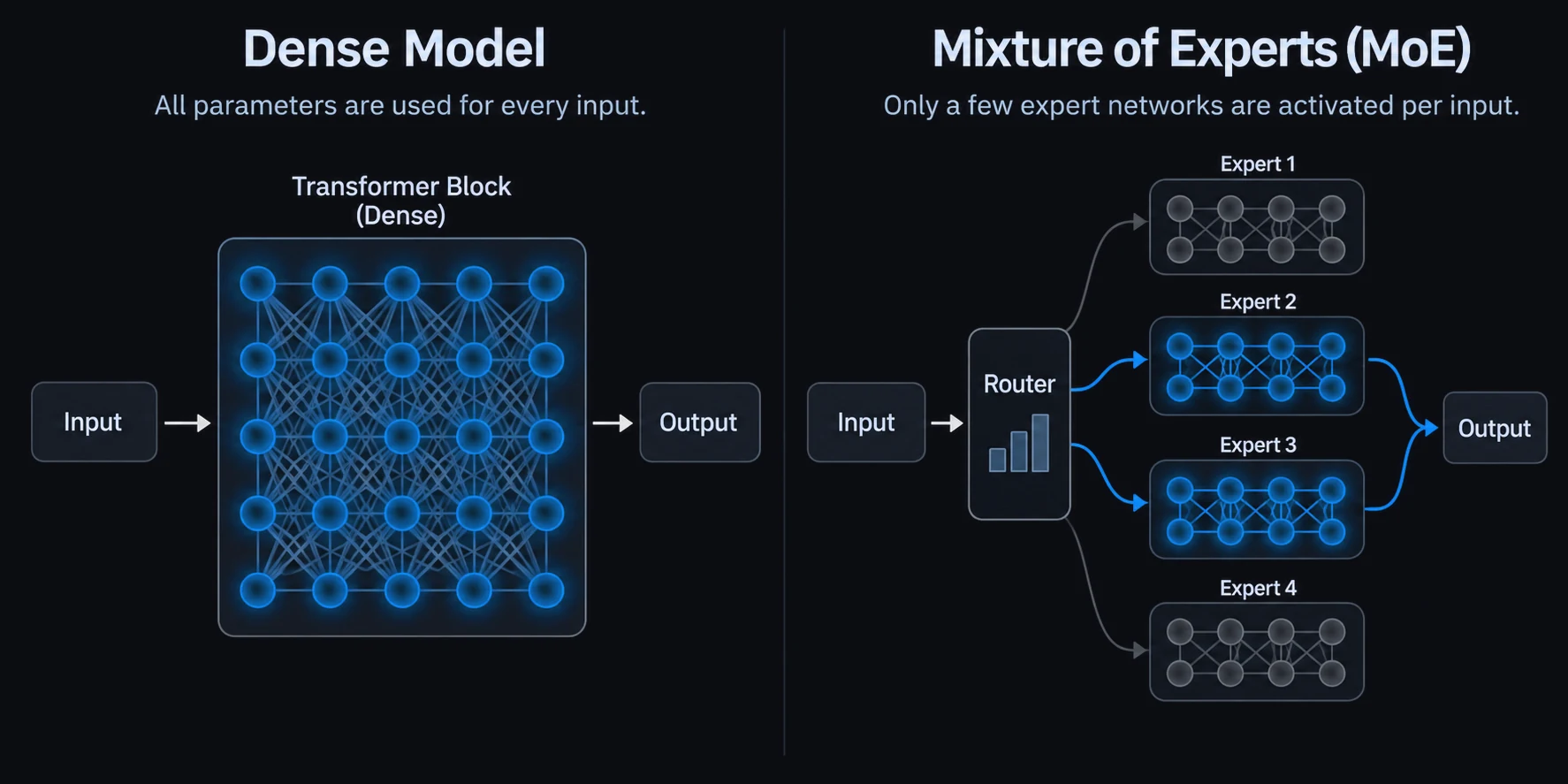
Let’s take a real example: Qwen3.6-35B-A3B has 35 billion parameters, but only 3 billion are active per token (that’s exactly what A3B in the model name means). This means the model will run well even if only part of it runs on the graphics card while the rest sits in normal RAM.
What about the Mac? Apple is playing in a different league
Macs with Apple Silicon have unified memory. The same memory is used by both the processor and the graphics, and it was built to be much faster than the RAM in a normal PC. That’s why Macs are popular with people who use local AI.
| What you have | What to try |
|---|---|
| 16 GB of RAM, an 8 GB graphics card or none | A small model, under 10 billion parameters |
| 32 GB of RAM and an 8–12 GB graphics card | Qwen3.6-35B-A3B in the Q4 version, split between VRAM and RAM |
| A 16 GB graphics card | Qwen3.8-27B in the Q3 version, entirely in VRAM, or Gemma 4 26B-A4B |
Best local LLM models in 2026
Lately AI models have been popping up like mushrooms, so read what follows as a snapshot of this autumn 2026. One piece of advice that will always hold, though: prefer recent models (they’re better optimized), prefer MoE if you’re short on VRAM, and start with small models.
- Qwen (Alibaba Group): the most loved and most widely used family among local AI users. Alibaba has released a huge number of these models in different sizes. Qwen3.6-35B-A3B is the one we recommend if you have a PC with 32 GB of RAM or more: fast, good at following instructions and well suited to agents.
- Dense models up to 27B: for example Qwen3.8-27B. If you have a graphics card with at least 16 GB of VRAM, the Q3 version loses more precision than the Q4, but it fits entirely in VRAM, which makes it fast.
- Gemma (Google): Google has released Gemma 4 in several sizes, including an MoE version (26B-A4B) that can run well even on mid-range PCs.
- The giants: models like DeepSeek-V4-Flash (284 billion parameters, 13 billion active) are the best local models there are, but they go beyond what a consumer PC can handle. You need a small data center, or special techniques like the ones Virsion is working on.
You’ll find almost all of these models (in a format called GGUF) on Hugging Face, the main model catalog. Most of them can also be used commercially, but check the license first.
How to run a local LLM
There are three ways to start using local models, all of them free.
- Ollama: the most popular app among developers. It lets you download and run models, even in the background, and many apps connect to Ollama. Recommended if a bit of terminal doesn’t scare you.
- LM Studio: a program with a graphical interface: download your model and start chatting. A good choice if you want zero hassle.
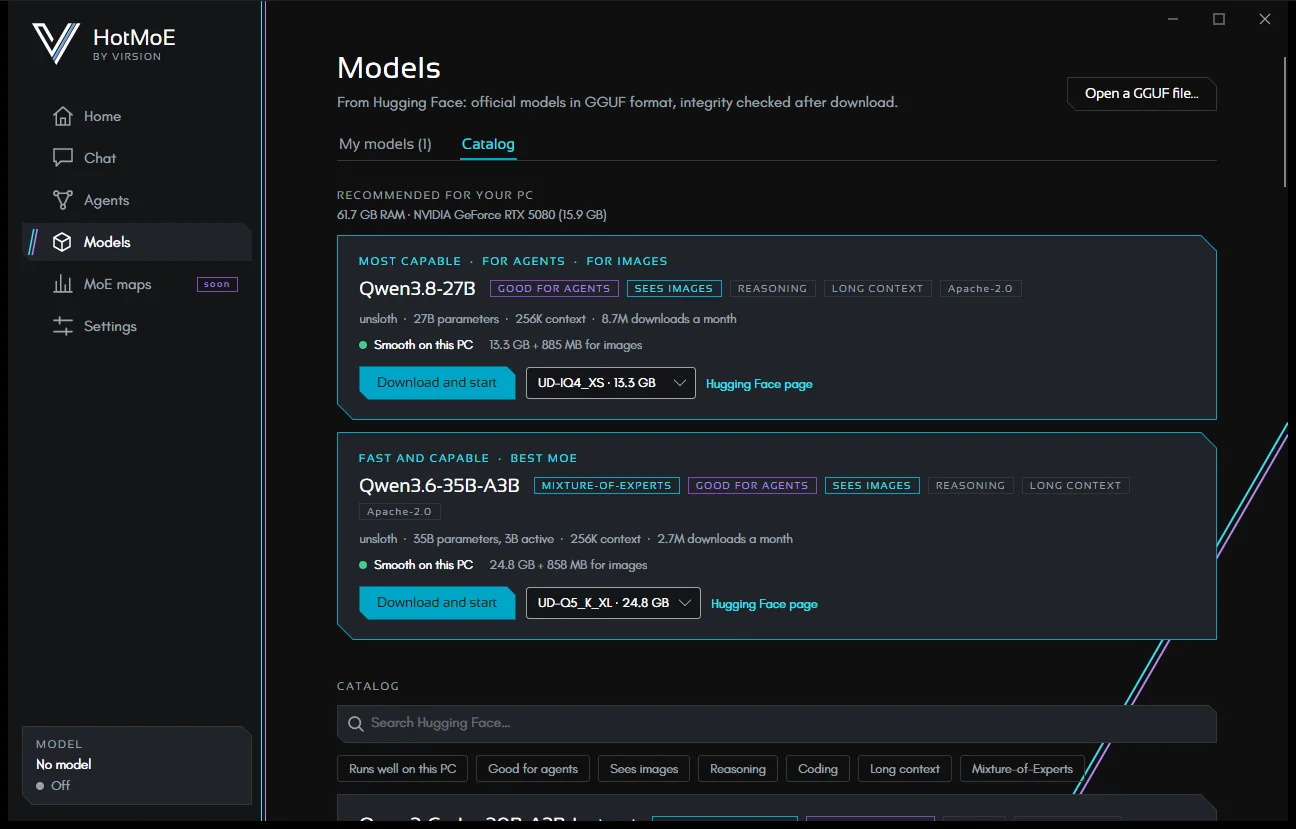
- Virsion software, coming soon: we’ll shortly be releasing our open source app for Windows, Mac and Linux. The app will be plug and play: on first launch it checks your hardware and suggests the models that best fit your PC. It has built-in agents that carry out different tasks, such as working on your files and your email, asking for confirmation before acting. But the real strength lies in some of our changes to the engine, which increase token output on models larger than your memory. Stay up to date on the HotMoE page.
Three mistakes to avoid
Downloading the biggest model: if the model fills all of your PC’s memory, everything slows down and the machine becomes unusable while tokens are being generated. In one of our tests, the largest model left only 200 MB of RAM free, and you could feel it. A little headroom doesn’t hurt.
Judging a model right away: every model has its strengths, so try it in different situations. A model that’s strong at code can be weak at writing, and vice versa.
Forgetting about context: unlike frontier models, local models can only “keep in mind” a limited context. With long documents, for example, the engine might refuse the request. Well-made apps handle these cases too. Either way, precision may drop, so keep that in mind.
Want to try it right now?
Open LM Studio or Ollama and download an AI model from Hugging Face. Ask it something you’d normally ask Claude or ChatGPT, and find out whether a local LLM is right for you.
We’ll soon be releasing our free software, which makes the experience plug and play and comes with several interesting features. Check out our site!