

Stuttering and performance in video games. Is Unreal Engine the problem?
 By Gianmarco Virzì ·
Technical Analysis and Reflections from a Developer
Unreal Engine 5 stuttering and performance: is it really responsible for the technical problems of so many modern video games? Or perhaps the problem lies elsewhere? As a developer who works daily with this graphics engine, I want to clarify a topic that has become far too polarized.
Introduction: the Debate on Unreal Engine is Often Misframed
In recent months, an increasingly large part of the gaming community has begun to openly criticize Unreal Engine 5, attributing problems such as stuttering, pop-in, unstable performance and graphics inefficiencies to it.
Let’s clarify one thing immediately: this is not about defending Unreal at all costs, nor denying that issues exist. However, many of the comments and criticisms circulating – even from technical content creators – lack a truly in-depth foundation.
The objective of this article is to explain, from a developer’s perspective, where the graphics engine’s responsibilities end and where those of the users begin.
Unreal Engine 5: a Powerful but Accessible Engine (and therefore Unfairly Blamed)
🔹 Democratization of video game development
Unreal Engine 5 is a very powerful and free tool, usable by anyone. This has allowed small studios to create games with ambitions and quality close to those of triple-A productions.
An example was the overwhelming success of Clair Obscure: Expedition 33*,* a title that demonstrates how even non-huge studios can reach very high quality peaks thanks to Unreal Engine 5.
The downside? Wide accessibility exposes the engine to not always optimal use. Unreal Engine is a truly enormous tool that requires its share of practice and experience to be mastered, furthermore, those with few funds or little time may end up releasing unpolished titles – and the blame, unfairly, is given to the engine.
🔹 Proprietary engines vs Unreal
A proprietary engine is created specifically for a particular type of game and optimized internally by the same team that develops it.
Unreal, instead, is a general purpose engine, designed to adapt to many different genres. This requires additional work during the optimization phase – which however is widely possible with the tools provided by Epic.

On the left, Senua’s Saga: Hellblade II, made with Unreal Engine 5; on the right, Horizon: Forbidden West, developed with the Decima Engine. Both represent extraordinary examples of the potential of their respective graphics engines. Image sources: senuassaga.com / blog.it.playstation.com
Stuttering and Performance: is it Really the Engine’s Fault?
🔹 Shader Compilation: the main culprit
Shader compilation is one of the main reasons for stuttering in games developed with Unreal. When a scene requires a new visual effect or a new material, the engine compiles shaders “on the fly,” causing micro-interruptions. Recently, compilation at first startup (with a loading screen) has been introduced which greatly reduces the problem of shader compilation stuttering, however, not all shaders can be precompiled, not solving one hundred percent of stutters.
On consoles, where hardware is uniform, this problem is prevented precisely by pre-compiling shaders. On PC, instead, the variety of configurations makes management more complex.
🔹 Streaming and garbage collection
UE uses dynamic asset streaming: it loads textures and models when needed. If the configuration of these systems is not optimized, pop-in and slowdowns can be observed.
The same applies to the garbage collector, a memory management system that can cause freezes when not managed correctly.
These two aspects, however, make it clear how careful optimization work is necessary to improve video game performance, optimization that unfortunately requires considerable time and funds to be completed.
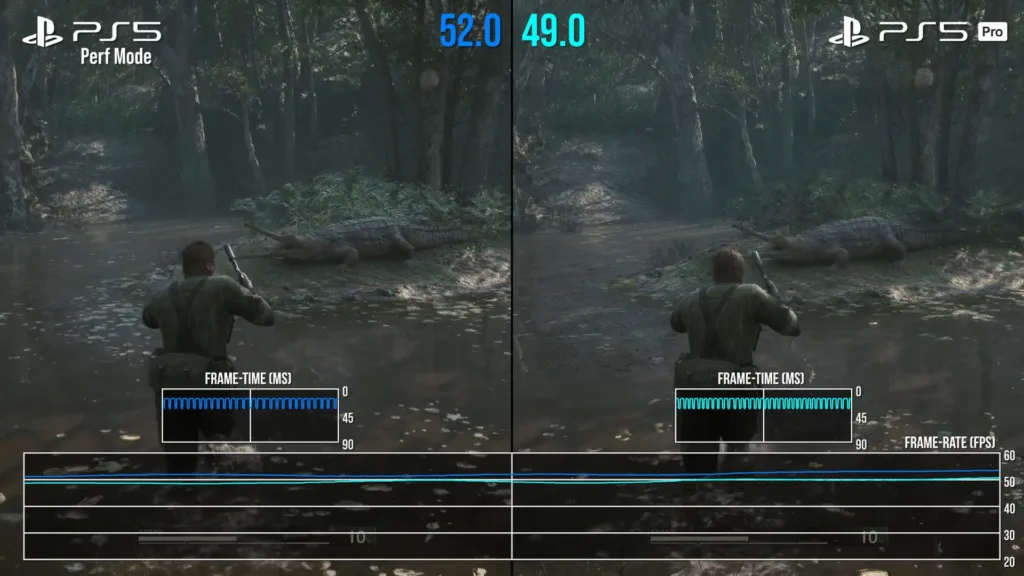
The frametime graph clearly shows the game’s stability: a flatter line with few oscillations generally corresponds to a smoother experience. Console versions, thanks to precompiled shaders, suffer less from stuttering phenomena. Image source: sensatez.net
🔹 Developer responsibilities
Many problems do not derive from the engine but from lack of experience, time or budget for development. Below are some examples that may not be seen by players, but that an experienced Unreal Engine developer can notice:
- Default graphics presets left unchanged (e.g. Low in Avowed);
- Game systems developed only in Blueprint when C++ code would be more performant;
- Missing optimizations in open-world environments despite the tools to manage them existing.
These are just some examples that can be made and that lead players to blame the graphics engine, rather than the developers or more specifically a lack of time or incorrect project management.
Unreal Engine 5 Innovations that Indirectly Reduce the Problem
🔹 Nanite: the quantum leap in detail
Nanite is a virtualized rendering system that manages millions of polygons without loading those not visible, reducing the impact on the GPU and improving productivity. To be clearer, in the past when creating a map when a 3D model was inserted, its polygons were loaded in their entirety, weighing down the load on the GPU. Nanite ensures that if for example we insert a rock halfway into the ground, the polygons not visible to the player are not loaded, lightening the load on the graphics processor. It is easy to understand how this can be a huge time saving in optimization for level designers, as well as making much richer and more detailed levels possible.
With version 5.4, Epic has also introduced Nanite Tessellation, which allows dynamic deformation of terrain – a revolutionary innovation, which increases detail and immersion.
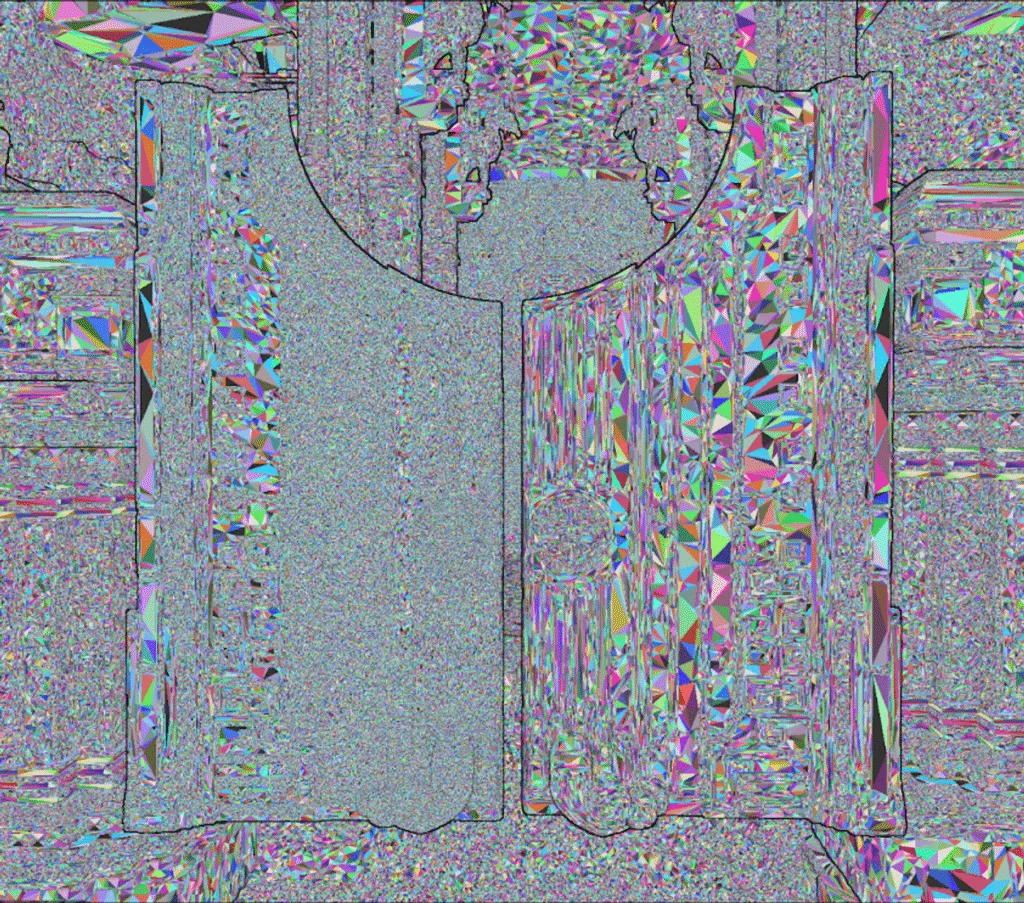
Visualization of nanite triangles with faceted normals (left) and smoothed (right). Image source: dev.epicgames.com
🔹 Lumen: real-time global illumination
Lumen allows realistic lighting without the need for baking, with a moderate cost compared to full Ray Tracing. This also translates into frightening time savings for developers, as baking forced long loading times during development “to fix” lights and shadows in the level, creating static textures for the latter.
For many titles, Lumen represents a perfect balance between performance and quality – and its future evolution, perhaps with AI support and hybrid Path Tracing, promises even more.
🔹 Other key tools that allow developers to save time
- Automatic retargeting of animations.
- Realistic displacement mapping.
- World Partition and HLOD to manage open worlds.
As we can see Epic with Unreal Engine is doing everything to make developers’ lives easier and perhaps this is precisely one of the reasons why it is increasingly adopted in both indie and triple-A environments?
Epic Acknowledges the Problem Anyway and Proposes Concrete Solutions
Contrary to what it may appear, Epic Games is very collaborative and despite everything recognizes the engine’s limitations and is actively working to solve some problems that actually fall under its responsibility.
Epic Games recently published a detailed article (available here) that confirms the existence of the issue and outlines the concrete measures taken to address it. The statements provided by Epic have been analyzed, verified, and used as a technical basis for drafting this article.
In this case we should enter into even more technical discussions, so we limit ourselves to mentioning what Epic states in the article.
In particular, the cause of the phenomenon is to be found in the use of Pipeline State Objects (PSO) with modern graphics APIs like DirectX 12 and Vulkan. As mentioned before this requires real-time data processing that can cause slowdowns.
Unreal Engine’s solution: intelligent PSO precaching
From Unreal Engine 5.2 Epic has introduced a PSO precaching system that anticipates the compilation of the most likely shaders in the background, avoiding them being processed at critical moments of gameplay.
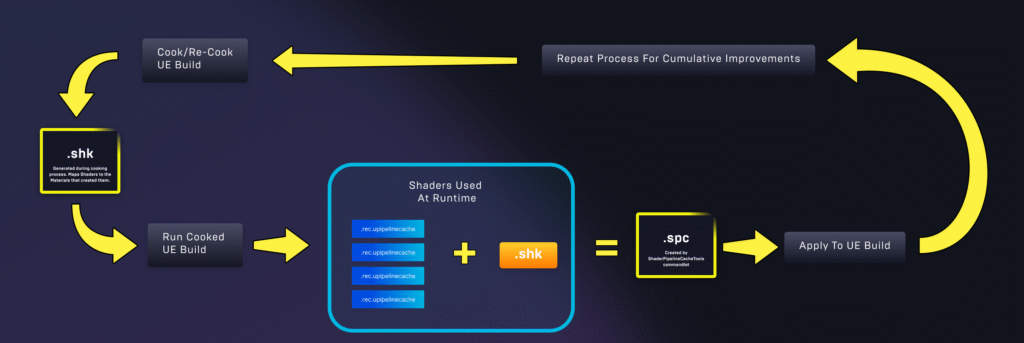
Technical diagram illustrating the cycle of collection and application of PSO (Pipeline State Objects) cache in Unreal Engine. Image source: dev.epicgames.com
Despite this, Epic is aware that the system is not yet perfect and some global shaders cannot be processed in advance. In fact, APIs are being developed that will allow signaling to the engine which future shaders to compile preventively.
In summary, stuttering from shader compilation is not ignored by Epic, on the contrary: it is the subject of active study and the solution is already partly implemented.
Furthermore, it is essential to say that Unreal Engine 5.6 (the latest version available today September 25, 2025 is 5.6.1) has introduced further innovations that can reduce the load on processors by up to 30% compared to the past, thanks to improvements made to Nanite, Lumen and Virtual Shadow Maps. Furthermore, performance in Open Worlds has improved – contributing to the reduction of traversal stuttering – thanks to a technology called Fast Geometry Streaming.
During Unreal Fest 2025, Epic developers identified 7 main causes of stuttering. Among these:
- Level streaming and inefficient use of static mesh.
- PSO compilation, already subject to the precaching system.
- Garbage collection and heavy synchronous loading.
- Heavy blueprints and non-optimized dynamic scripts.
Epic therefore, continues to release tools and best practices to address every type of hitch as part of the initiative called Great Hitch Hunt.
Misinformation and Content Creator Responsibility
🔹 Technical “hearsay”
Unfortunately, many of the criticisms directed at UE5 derive from video content that is not sufficiently in-depth, which is often then relaunched by users without technical background.
The consequence? A distorted narrative, where the engine is blamed even when it is not responsible.
“When something doesn’t work it’s UE’s fault, when something is beautiful it’s the developers’ merit” – but different studios with the same engine produce different results, so isn’t it perhaps that the topic requires more in-depth analysis?
🔹 The real problem is production, not the engine
Many games reach the market unoptimized not because of Unreal Engine, but for reasons related to deadlines, marketing and business dynamics. The developer is often forced to release before being able to refine, also leading to the release of heavy post-launch patches that in most cases only partially solve the problems.
Conclusion: Unreal Engine is an Opportunity, not an Enemy
Unreal Engine is not perfect, no engine is. But it is an exceptionally powerful tool, well written, rich in innovative technologies and constantly updated.
In competent hands, Unreal enables the birth of titles that – until a few years ago – would have been unthinkable outside of triple-A teams.
To gamers, my invitation is this: criticize with criteria, and try to distinguish between the means and the way it is used.
To content creators: also talk to developers, don’t just stop at appearances. If you are developing in UE5 and have encountered similar issues, contact us: we are happy to discuss and share our experience.
If you liked this article I recommend visiting our project page: Project Tear